










-
More Information
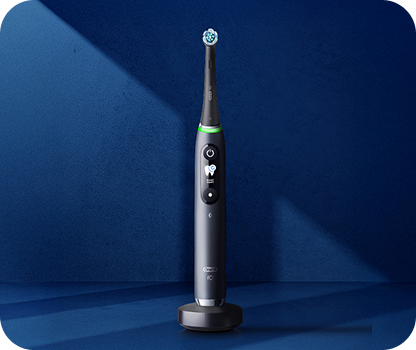
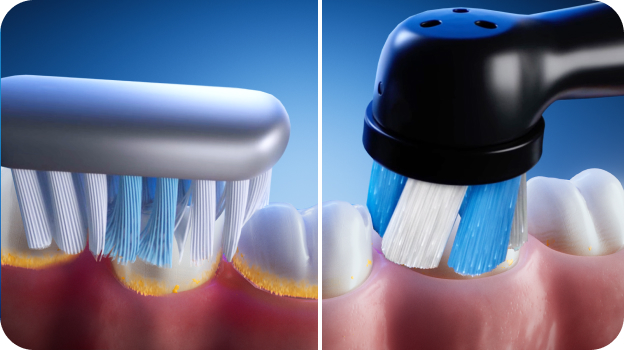
Powered by Oral‑B’s magnetic iO technology, gentle micro‑vibrations are precisely synchronized with oscillations to deliver a smooth, harmonious clean. The dentist‑inspired round brush head surrounds each tooth for an effective yet gentle brushing experience.
*Based on surveys of a representative worldwide sample of dentists carried out for P&G regularly.
A built‑in 2‑minute timer, with Oral‑B’s quadrant pacing, guides you through brushing each area of your mouth for the dentist‑recommended clean—we keep the time, so you don’t have to.
The visible pressure sensor helps protect your gums by indicating optimal brushing pressure and alerting you if you’re brushing too hard.
Complete with a travel case, the iO Series 3 delivers a fresh, confident clean whether you’re at home or on the go. Best of all, it’s brought to you by Oral‑B—the #1 brand used by dentists worldwide*.
Do not use on children under age 3.
Replace brush head every 3 months or sooner if brush head becomes worn.- RECOMMENDED FOR SENSITIVE TEETH & HEALTHY GUMS — comfortable, gentle micro-vibrations help support healthy gums from the first brush
- Clinically proven to remove 400% more plaque along the gumline vs. a regular manual toothbrush
- VISIBLE PRESSURE SENSOR + 2-MIN GUIDED TIMER protect your gums by indicating optimal pressure and pacing a complete, dentist-recommended clean
- 3 SMART CLEANING MODES FOR A PERSONALIZED CLEAN — Daily Clean, Whiten, and Sensitive
- BRUSH FOR THE DENTIST‑RECOMMENDED TIME with a 2‑minute timer to ensure a complete clean
- TRUST ORAL‑B — THE BRAND DENTISTS USE THE MOST WORLDWIDE
- TRY ORAL‑B ELECTRIC TOOTHBRUSHES CAREFREE with a 30‑DAY MONEY‑BACK GUARANTEE
- (1) Oral-B iO Series 3 Rechargeable Electric Toothbrush. Height: handle + brush head: 9.25 in, 24.5 cm; handle only: 7.2 in, 18.3 cm. Weight: handle + brush head: 4.4 oz, 124 g; handle only: 4.1 oz, 117 g.
- (1) Ultimate Clean Replacement Brush Head
- (1) Travel Case
- (1) Charger
• CNET: Brighten Your Smile and Save Over $40 on This Oral-B iO Rechargeable Toothbrush - CNET
• HerCampus: Upgrade Your Oral Care Routine With This Toothbrush
• TODAY: The Best Expert- and Editor-Approved Tech Gifts in 2026
• PCMag: Best Buy's Top Back-to-School Deals From Apple, HP, Lenovo, TP-Link, and More | PCMag
• How do I clean my Oral-B iO Electric Toothbrush?
• The Best Toothbrushes for Gum Health
What is covered in my Oral-B warranty?
Your Oral-B warranty starts on the day of purchase and runs for 2 years. If your Oral-B product is defective during the warranty period, we will replace it free of charge*.
The warranty does not cover cosmetic damage such as scratches, or damage caused by:
- Normal wear and tear
- Accident, misuse, dirt or water
- The product being tampered with
- Improper use
- Repairs carried out by agents not authorized by Oral-B/Braun
- Failure to take proper care of the product, including recharging
- The product being altered or used for commercial purposes
*The Service Center will send you a like-for-like technical replacement, or if this is not possible a device of a higher specification. The Service Center may not be able to supply a toothbrush of the same color.
How can I get my Oral-B electric toothbrush serviced?
If you’re experiencing a problem with your Oral-B toothbrush, check out our Online Repair Service! There you’ll find troubleshooting tips which may help resolve the issue. Simply go to www.service.oralb.com, select your Region, Country and Language and then click on the "Online Check" button.
If you’re unable to fix the problem and need to send your toothbrush for service, you can use the online service to print off a pre-paid mailing label and get a tracking number. The tracking number will enable you to track the progress of your request. Please note you must have a receipt that includes date of purchase to get a pre-paid mailing label and your brush must be within its warranty period.
If you’re unable to use the Online Repair Service, please see the instructions below.
For In Warranty service, follow these simple steps:
- Visit www.service.oralb.com to find details of your closest Oral-B Authorized Service Center.
- Send the product directly to the Service Center, including:
- All system components (e.g., toothbrush handle, charger, power cord, SmartGuide). You do not need to include accessories like the brush heads or refill stand.
- A copy of your dated proof of purchase (always keep a copy for yourself).
- A letter including the following information: your name, return mailing address, contact phone number, e-mail address and a brief explanation of the problem you're experiencing with the product.
If you include your e-mail address, the Oral-B Service center will send you updates when the product is received and when product is shipped back, along with a tracking number.
All products sent in for service must be well packaged and sent in a box suitable to withstand normal freight handling. It is recommended that your package is appropriately insured and shipped using a carrier who can provide tracking. We will cover all repair costs and return shipping to you.
For Out of Warranty service: You can still send your device to an Oral-B Authorized Service Center for service at your own cost. If the product warranty has expired, a quote will be sent to you for approval and payment, prior to any service. Before shipping your device, we recommend you call the authorized Service Center to discuss your service needs.
-
What's in the box
Powered by Oral‑B’s magnetic iO technology, gentle micro‑vibrations are precisely synchronized with oscillations to deliver a smooth, harmonious clean. The dentist‑inspired round brush head surrounds each tooth for an effective yet gentle brushing experience.
*Based on surveys of a representative worldwide sample of dentists carried out for P&G regularly.
A built‑in 2‑minute timer, with Oral‑B’s quadrant pacing, guides you through brushing each area of your mouth for the dentist‑recommended clean—we keep the time, so you don’t have to.
The visible pressure sensor helps protect your gums by indicating optimal brushing pressure and alerting you if you’re brushing too hard.
Complete with a travel case, the iO Series 3 delivers a fresh, confident clean whether you’re at home or on the go. Best of all, it’s brought to you by Oral‑B—the #1 brand used by dentists worldwide*.
Do not use on children under age 3.
Replace brush head every 3 months or sooner if brush head becomes worn.- RECOMMENDED FOR SENSITIVE TEETH & HEALTHY GUMS — comfortable, gentle micro-vibrations help support healthy gums from the first brush
- Clinically proven to remove 400% more plaque along the gumline vs. a regular manual toothbrush
- VISIBLE PRESSURE SENSOR + 2-MIN GUIDED TIMER protect your gums by indicating optimal pressure and pacing a complete, dentist-recommended clean
- 3 SMART CLEANING MODES FOR A PERSONALIZED CLEAN — Daily Clean, Whiten, and Sensitive
- BRUSH FOR THE DENTIST‑RECOMMENDED TIME with a 2‑minute timer to ensure a complete clean
- TRUST ORAL‑B — THE BRAND DENTISTS USE THE MOST WORLDWIDE
- TRY ORAL‑B ELECTRIC TOOTHBRUSHES CAREFREE with a 30‑DAY MONEY‑BACK GUARANTEE
- (1) Oral-B iO Series 3 Rechargeable Electric Toothbrush. Height: handle + brush head: 9.25 in, 24.5 cm; handle only: 7.2 in, 18.3 cm. Weight: handle + brush head: 4.4 oz, 124 g; handle only: 4.1 oz, 117 g.
- (1) Ultimate Clean Replacement Brush Head
- (1) Travel Case
- (1) Charger
• CNET: Brighten Your Smile and Save Over $40 on This Oral-B iO Rechargeable Toothbrush - CNET
• HerCampus: Upgrade Your Oral Care Routine With This Toothbrush
• TODAY: The Best Expert- and Editor-Approved Tech Gifts in 2026
• PCMag: Best Buy's Top Back-to-School Deals From Apple, HP, Lenovo, TP-Link, and More | PCMag
• How do I clean my Oral-B iO Electric Toothbrush?
• The Best Toothbrushes for Gum Health
What is covered in my Oral-B warranty?
Your Oral-B warranty starts on the day of purchase and runs for 2 years. If your Oral-B product is defective during the warranty period, we will replace it free of charge*.
The warranty does not cover cosmetic damage such as scratches, or damage caused by:
- Normal wear and tear
- Accident, misuse, dirt or water
- The product being tampered with
- Improper use
- Repairs carried out by agents not authorized by Oral-B/Braun
- Failure to take proper care of the product, including recharging
- The product being altered or used for commercial purposes
*The Service Center will send you a like-for-like technical replacement, or if this is not possible a device of a higher specification. The Service Center may not be able to supply a toothbrush of the same color.
How can I get my Oral-B electric toothbrush serviced?
If you’re experiencing a problem with your Oral-B toothbrush, check out our Online Repair Service! There you’ll find troubleshooting tips which may help resolve the issue. Simply go to www.service.oralb.com, select your Region, Country and Language and then click on the "Online Check" button.
If you’re unable to fix the problem and need to send your toothbrush for service, you can use the online service to print off a pre-paid mailing label and get a tracking number. The tracking number will enable you to track the progress of your request. Please note you must have a receipt that includes date of purchase to get a pre-paid mailing label and your brush must be within its warranty period.
If you’re unable to use the Online Repair Service, please see the instructions below.
For In Warranty service, follow these simple steps:
- Visit www.service.oralb.com to find details of your closest Oral-B Authorized Service Center.
- Send the product directly to the Service Center, including:
- All system components (e.g., toothbrush handle, charger, power cord, SmartGuide). You do not need to include accessories like the brush heads or refill stand.
- A copy of your dated proof of purchase (always keep a copy for yourself).
- A letter including the following information: your name, return mailing address, contact phone number, e-mail address and a brief explanation of the problem you're experiencing with the product.
If you include your e-mail address, the Oral-B Service center will send you updates when the product is received and when product is shipped back, along with a tracking number.
All products sent in for service must be well packaged and sent in a box suitable to withstand normal freight handling. It is recommended that your package is appropriately insured and shipped using a carrier who can provide tracking. We will cover all repair costs and return shipping to you.
For Out of Warranty service: You can still send your device to an Oral-B Authorized Service Center for service at your own cost. If the product warranty has expired, a quote will be sent to you for approval and payment, prior to any service. Before shipping your device, we recommend you call the authorized Service Center to discuss your service needs.
-
Make the most of every session
Powered by Oral‑B’s magnetic iO technology, gentle micro‑vibrations are precisely synchronized with oscillations to deliver a smooth, harmonious clean. The dentist‑inspired round brush head surrounds each tooth for an effective yet gentle brushing experience.
*Based on surveys of a representative worldwide sample of dentists carried out for P&G regularly.
A built‑in 2‑minute timer, with Oral‑B’s quadrant pacing, guides you through brushing each area of your mouth for the dentist‑recommended clean—we keep the time, so you don’t have to.
The visible pressure sensor helps protect your gums by indicating optimal brushing pressure and alerting you if you’re brushing too hard.
Complete with a travel case, the iO Series 3 delivers a fresh, confident clean whether you’re at home or on the go. Best of all, it’s brought to you by Oral‑B—the #1 brand used by dentists worldwide*.
Do not use on children under age 3.
Replace brush head every 3 months or sooner if brush head becomes worn.- RECOMMENDED FOR SENSITIVE TEETH & HEALTHY GUMS — comfortable, gentle micro-vibrations help support healthy gums from the first brush
- Clinically proven to remove 400% more plaque along the gumline vs. a regular manual toothbrush
- VISIBLE PRESSURE SENSOR + 2-MIN GUIDED TIMER protect your gums by indicating optimal pressure and pacing a complete, dentist-recommended clean
- 3 SMART CLEANING MODES FOR A PERSONALIZED CLEAN — Daily Clean, Whiten, and Sensitive
- BRUSH FOR THE DENTIST‑RECOMMENDED TIME with a 2‑minute timer to ensure a complete clean
- TRUST ORAL‑B — THE BRAND DENTISTS USE THE MOST WORLDWIDE
- TRY ORAL‑B ELECTRIC TOOTHBRUSHES CAREFREE with a 30‑DAY MONEY‑BACK GUARANTEE
- (1) Oral-B iO Series 3 Rechargeable Electric Toothbrush. Height: handle + brush head: 9.25 in, 24.5 cm; handle only: 7.2 in, 18.3 cm. Weight: handle + brush head: 4.4 oz, 124 g; handle only: 4.1 oz, 117 g.
- (1) Ultimate Clean Replacement Brush Head
- (1) Travel Case
- (1) Charger
• CNET: Brighten Your Smile and Save Over $40 on This Oral-B iO Rechargeable Toothbrush - CNET
• HerCampus: Upgrade Your Oral Care Routine With This Toothbrush
• TODAY: The Best Expert- and Editor-Approved Tech Gifts in 2026
• PCMag: Best Buy's Top Back-to-School Deals From Apple, HP, Lenovo, TP-Link, and More | PCMag
• How do I clean my Oral-B iO Electric Toothbrush?
• The Best Toothbrushes for Gum Health
What is covered in my Oral-B warranty?
Your Oral-B warranty starts on the day of purchase and runs for 2 years. If your Oral-B product is defective during the warranty period, we will replace it free of charge*.
The warranty does not cover cosmetic damage such as scratches, or damage caused by:
- Normal wear and tear
- Accident, misuse, dirt or water
- The product being tampered with
- Improper use
- Repairs carried out by agents not authorized by Oral-B/Braun
- Failure to take proper care of the product, including recharging
- The product being altered or used for commercial purposes
*The Service Center will send you a like-for-like technical replacement, or if this is not possible a device of a higher specification. The Service Center may not be able to supply a toothbrush of the same color.
How can I get my Oral-B electric toothbrush serviced?
If you’re experiencing a problem with your Oral-B toothbrush, check out our Online Repair Service! There you’ll find troubleshooting tips which may help resolve the issue. Simply go to www.service.oralb.com, select your Region, Country and Language and then click on the "Online Check" button.
If you’re unable to fix the problem and need to send your toothbrush for service, you can use the online service to print off a pre-paid mailing label and get a tracking number. The tracking number will enable you to track the progress of your request. Please note you must have a receipt that includes date of purchase to get a pre-paid mailing label and your brush must be within its warranty period.
If you’re unable to use the Online Repair Service, please see the instructions below.
For In Warranty service, follow these simple steps:
- Visit www.service.oralb.com to find details of your closest Oral-B Authorized Service Center.
- Send the product directly to the Service Center, including:
- All system components (e.g., toothbrush handle, charger, power cord, SmartGuide). You do not need to include accessories like the brush heads or refill stand.
- A copy of your dated proof of purchase (always keep a copy for yourself).
- A letter including the following information: your name, return mailing address, contact phone number, e-mail address and a brief explanation of the problem you're experiencing with the product.
If you include your e-mail address, the Oral-B Service center will send you updates when the product is received and when product is shipped back, along with a tracking number.
All products sent in for service must be well packaged and sent in a box suitable to withstand normal freight handling. It is recommended that your package is appropriately insured and shipped using a carrier who can provide tracking. We will cover all repair costs and return shipping to you.
For Out of Warranty service: You can still send your device to an Oral-B Authorized Service Center for service at your own cost. If the product warranty has expired, a quote will be sent to you for approval and payment, prior to any service. Before shipping your device, we recommend you call the authorized Service Center to discuss your service needs.
-
Featured in
Powered by Oral‑B’s magnetic iO technology, gentle micro‑vibrations are precisely synchronized with oscillations to deliver a smooth, harmonious clean. The dentist‑inspired round brush head surrounds each tooth for an effective yet gentle brushing experience.
*Based on surveys of a representative worldwide sample of dentists carried out for P&G regularly.
A built‑in 2‑minute timer, with Oral‑B’s quadrant pacing, guides you through brushing each area of your mouth for the dentist‑recommended clean—we keep the time, so you don’t have to.
The visible pressure sensor helps protect your gums by indicating optimal brushing pressure and alerting you if you’re brushing too hard.
Complete with a travel case, the iO Series 3 delivers a fresh, confident clean whether you’re at home or on the go. Best of all, it’s brought to you by Oral‑B—the #1 brand used by dentists worldwide*.
Do not use on children under age 3.
Replace brush head every 3 months or sooner if brush head becomes worn.- RECOMMENDED FOR SENSITIVE TEETH & HEALTHY GUMS — comfortable, gentle micro-vibrations help support healthy gums from the first brush
- Clinically proven to remove 400% more plaque along the gumline vs. a regular manual toothbrush
- VISIBLE PRESSURE SENSOR + 2-MIN GUIDED TIMER protect your gums by indicating optimal pressure and pacing a complete, dentist-recommended clean
- 3 SMART CLEANING MODES FOR A PERSONALIZED CLEAN — Daily Clean, Whiten, and Sensitive
- BRUSH FOR THE DENTIST‑RECOMMENDED TIME with a 2‑minute timer to ensure a complete clean
- TRUST ORAL‑B — THE BRAND DENTISTS USE THE MOST WORLDWIDE
- TRY ORAL‑B ELECTRIC TOOTHBRUSHES CAREFREE with a 30‑DAY MONEY‑BACK GUARANTEE
- (1) Oral-B iO Series 3 Rechargeable Electric Toothbrush. Height: handle + brush head: 9.25 in, 24.5 cm; handle only: 7.2 in, 18.3 cm. Weight: handle + brush head: 4.4 oz, 124 g; handle only: 4.1 oz, 117 g.
- (1) Ultimate Clean Replacement Brush Head
- (1) Travel Case
- (1) Charger
• CNET: Brighten Your Smile and Save Over $40 on This Oral-B iO Rechargeable Toothbrush - CNET
• HerCampus: Upgrade Your Oral Care Routine With This Toothbrush
• TODAY: The Best Expert- and Editor-Approved Tech Gifts in 2026
• PCMag: Best Buy's Top Back-to-School Deals From Apple, HP, Lenovo, TP-Link, and More | PCMag
• How do I clean my Oral-B iO Electric Toothbrush?
• The Best Toothbrushes for Gum Health
What is covered in my Oral-B warranty?
Your Oral-B warranty starts on the day of purchase and runs for 2 years. If your Oral-B product is defective during the warranty period, we will replace it free of charge*.
The warranty does not cover cosmetic damage such as scratches, or damage caused by:
- Normal wear and tear
- Accident, misuse, dirt or water
- The product being tampered with
- Improper use
- Repairs carried out by agents not authorized by Oral-B/Braun
- Failure to take proper care of the product, including recharging
- The product being altered or used for commercial purposes
*The Service Center will send you a like-for-like technical replacement, or if this is not possible a device of a higher specification. The Service Center may not be able to supply a toothbrush of the same color.
How can I get my Oral-B electric toothbrush serviced?
If you’re experiencing a problem with your Oral-B toothbrush, check out our Online Repair Service! There you’ll find troubleshooting tips which may help resolve the issue. Simply go to www.service.oralb.com, select your Region, Country and Language and then click on the "Online Check" button.
If you’re unable to fix the problem and need to send your toothbrush for service, you can use the online service to print off a pre-paid mailing label and get a tracking number. The tracking number will enable you to track the progress of your request. Please note you must have a receipt that includes date of purchase to get a pre-paid mailing label and your brush must be within its warranty period.
If you’re unable to use the Online Repair Service, please see the instructions below.
For In Warranty service, follow these simple steps:
- Visit www.service.oralb.com to find details of your closest Oral-B Authorized Service Center.
- Send the product directly to the Service Center, including:
- All system components (e.g., toothbrush handle, charger, power cord, SmartGuide). You do not need to include accessories like the brush heads or refill stand.
- A copy of your dated proof of purchase (always keep a copy for yourself).
- A letter including the following information: your name, return mailing address, contact phone number, e-mail address and a brief explanation of the problem you're experiencing with the product.
If you include your e-mail address, the Oral-B Service center will send you updates when the product is received and when product is shipped back, along with a tracking number.
All products sent in for service must be well packaged and sent in a box suitable to withstand normal freight handling. It is recommended that your package is appropriately insured and shipped using a carrier who can provide tracking. We will cover all repair costs and return shipping to you.
For Out of Warranty service: You can still send your device to an Oral-B Authorized Service Center for service at your own cost. If the product warranty has expired, a quote will be sent to you for approval and payment, prior to any service. Before shipping your device, we recommend you call the authorized Service Center to discuss your service needs.
-
Warranty Information
Powered by Oral‑B’s magnetic iO technology, gentle micro‑vibrations are precisely synchronized with oscillations to deliver a smooth, harmonious clean. The dentist‑inspired round brush head surrounds each tooth for an effective yet gentle brushing experience.
*Based on surveys of a representative worldwide sample of dentists carried out for P&G regularly.
A built‑in 2‑minute timer, with Oral‑B’s quadrant pacing, guides you through brushing each area of your mouth for the dentist‑recommended clean—we keep the time, so you don’t have to.
The visible pressure sensor helps protect your gums by indicating optimal brushing pressure and alerting you if you’re brushing too hard.
Complete with a travel case, the iO Series 3 delivers a fresh, confident clean whether you’re at home or on the go. Best of all, it’s brought to you by Oral‑B—the #1 brand used by dentists worldwide*.
Do not use on children under age 3.
Replace brush head every 3 months or sooner if brush head becomes worn.- RECOMMENDED FOR SENSITIVE TEETH & HEALTHY GUMS — comfortable, gentle micro-vibrations help support healthy gums from the first brush
- Clinically proven to remove 400% more plaque along the gumline vs. a regular manual toothbrush
- VISIBLE PRESSURE SENSOR + 2-MIN GUIDED TIMER protect your gums by indicating optimal pressure and pacing a complete, dentist-recommended clean
- 3 SMART CLEANING MODES FOR A PERSONALIZED CLEAN — Daily Clean, Whiten, and Sensitive
- BRUSH FOR THE DENTIST‑RECOMMENDED TIME with a 2‑minute timer to ensure a complete clean
- TRUST ORAL‑B — THE BRAND DENTISTS USE THE MOST WORLDWIDE
- TRY ORAL‑B ELECTRIC TOOTHBRUSHES CAREFREE with a 30‑DAY MONEY‑BACK GUARANTEE
- (1) Oral-B iO Series 3 Rechargeable Electric Toothbrush. Height: handle + brush head: 9.25 in, 24.5 cm; handle only: 7.2 in, 18.3 cm. Weight: handle + brush head: 4.4 oz, 124 g; handle only: 4.1 oz, 117 g.
- (1) Ultimate Clean Replacement Brush Head
- (1) Travel Case
- (1) Charger
• CNET: Brighten Your Smile and Save Over $40 on This Oral-B iO Rechargeable Toothbrush - CNET
• HerCampus: Upgrade Your Oral Care Routine With This Toothbrush
• TODAY: The Best Expert- and Editor-Approved Tech Gifts in 2026
• PCMag: Best Buy's Top Back-to-School Deals From Apple, HP, Lenovo, TP-Link, and More | PCMag
• How do I clean my Oral-B iO Electric Toothbrush?
• The Best Toothbrushes for Gum Health
What is covered in my Oral-B warranty?
Your Oral-B warranty starts on the day of purchase and runs for 2 years. If your Oral-B product is defective during the warranty period, we will replace it free of charge*.
The warranty does not cover cosmetic damage such as scratches, or damage caused by:
- Normal wear and tear
- Accident, misuse, dirt or water
- The product being tampered with
- Improper use
- Repairs carried out by agents not authorized by Oral-B/Braun
- Failure to take proper care of the product, including recharging
- The product being altered or used for commercial purposes
*The Service Center will send you a like-for-like technical replacement, or if this is not possible a device of a higher specification. The Service Center may not be able to supply a toothbrush of the same color.
How can I get my Oral-B electric toothbrush serviced?
If you’re experiencing a problem with your Oral-B toothbrush, check out our Online Repair Service! There you’ll find troubleshooting tips which may help resolve the issue. Simply go to www.service.oralb.com, select your Region, Country and Language and then click on the "Online Check" button.
If you’re unable to fix the problem and need to send your toothbrush for service, you can use the online service to print off a pre-paid mailing label and get a tracking number. The tracking number will enable you to track the progress of your request. Please note you must have a receipt that includes date of purchase to get a pre-paid mailing label and your brush must be within its warranty period.
If you’re unable to use the Online Repair Service, please see the instructions below.
For In Warranty service, follow these simple steps:
- Visit www.service.oralb.com to find details of your closest Oral-B Authorized Service Center.
- Send the product directly to the Service Center, including:
- All system components (e.g., toothbrush handle, charger, power cord, SmartGuide). You do not need to include accessories like the brush heads or refill stand.
- A copy of your dated proof of purchase (always keep a copy for yourself).
- A letter including the following information: your name, return mailing address, contact phone number, e-mail address and a brief explanation of the problem you're experiencing with the product.
If you include your e-mail address, the Oral-B Service center will send you updates when the product is received and when product is shipped back, along with a tracking number.
All products sent in for service must be well packaged and sent in a box suitable to withstand normal freight handling. It is recommended that your package is appropriately insured and shipped using a carrier who can provide tracking. We will cover all repair costs and return shipping to you.
For Out of Warranty service: You can still send your device to an Oral-B Authorized Service Center for service at your own cost. If the product warranty has expired, a quote will be sent to you for approval and payment, prior to any service. Before shipping your device, we recommend you call the authorized Service Center to discuss your service needs.


Oral-B iO Series 3 Clean & Protect Rechargeable Electric Toothbrush, Matte White
- SKU:
- 069055132975
- UPC:
- 069055132975
- Minimum Purchase:
- 1 unit
- Maximum Purchase:
- 5 units
- X_shortDescription:
- Clinically Proven 400% More Plaque Removal Along Gumline versus a regular manual toothbrush.
- bvProductId:
- 069055132975
- pricespider-button-enablement_X:
- yes
- Shop By Feature:
- 3 SMART Brushing Modes
- Shop By Feature:
- 1 Brush
- Shop By Feature:
- 1 refill head
- Shop By Feature:
- 1-Magnetic Charger
- couponCardSort:
- 0
- color-picker:
- Alabaster-2x
- sort-color:
- 2
- display-price-discount-percentage:
- yes
- BV-product-family-internal:
- 80726206,80726206
- et-sort:
- 10
- Refill-Product-Id:
- 1520
- TextFeature1:
- 3 Smart Brushing Modes
- TextFeature2:
- Smart Pressure Sensor
- TextFeature3:
- Charging Station
- TextFeature4:
- 1 Oral-B iO Ultimate Clean Replacement Brush Head
- coupon-img:
- /content/jas/iO/find-your-iO/brushes/iO3 White.png
- couponTitleEtb:
- iO™ SERIES 3
- gift-card-img:
- /content/weddingGuide/GiftsCarousel/Products/wedding-io3-white-2x.png
- gift-card-desc:
- 3 Smart Brushing Modes for an optimal clean.
- hideReview:
- yes
- couponTitle:
- Oral-B iO Series 3 Rechargeable Electric Toothbrush, colors available
- hide-search:
- true
- restrict-coupon:
- yes
- promotionHeading:
- Summer Savings:
- promotionDescription:
- Save $30 on your Oral-B iO Series 3 purchase, only from Oral-B. Limited quantities available and no additional discounts apply. Applied automatically when added to cart.
- algolia-hierarchy:
- deals_Up-to-$50 Off
- badgeText:
- Sale:tag-svg.svg
- promotionText:
- Fall Savings: Save $20 on your Oral-B iO Series 3 purchase, only from Oral-B. Limited quantities available and no additional discounts apply. Applied automatically when added to cart.
- colorSwatches:
- iO3-Matte White
- freeShippingText:
- Free Shipping
- offerInfo:
- $20 off
You May Also Like

 Subscribe & Save 20%
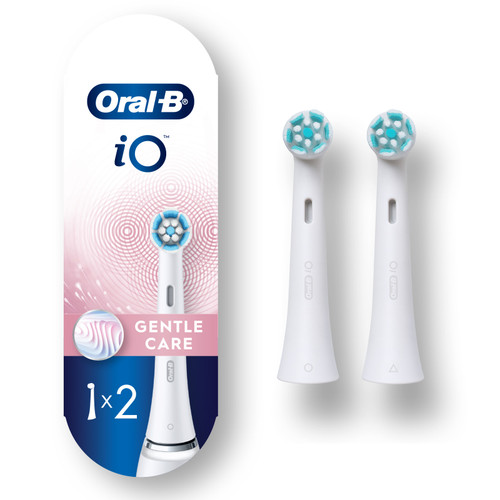
Oral-B iO Gentle Care Replacement Brush Heads, 2-Count, White
$29.99
Free Shipping
Add to cartOral-B iO Series 3 Clean & Protect Rechargeable Electric Toothbrush
How to change modes on Oral-B iO Series 3?
1. Turn the brush on with the power button.
2. While it’s running, briefly press the mode (lower) button to cycle through the available modes (each press advances to the next mode).
3. Stop pressing when you have the desired mode; the brush will use that mode until you change it.
What is the difference between Oral-B iO Series 2 and 3?
The primary differences between the Oral-B iO Series 2 and 3 are the pressure sensor feedback and user interface. Other differences include:
- Display/indicator: Series 3 uses a more visible light ring/handle indicator, while Series 2 uses a simpler indicator.
- User interface: Series 3 makes pressure feedback easier to see during brushing, while Series 2 has a more basic interface.
- Modes: Both offer three cleaning modes.
- Pressure feedback: Series 3 has a 360 degree Smart Light Ring that shows when you’re brushing too hard, not hard enough, or just right, while Series 2 provides simpler pressure feedback for overbrushing.
How many cleaning modes does the Oral-B iO Series 3 have?
The Oral-B iO Series 3 has three cleaning modes: Daily Clean, Sensitive, and Whitening.
How to reset Oral-B iO toothbrush Series 3?
To reset the Oral-B iO Series 3 toothbrush, follow these steps:
1. Turn the brush off.
2. Press and hold the power button for about 10 seconds.
3. Wait until it reboots.
What brush head is included in Oral-B iO Series 3?
The Oral-B Ultimate Clean Replacement Brush Head is included with the Oral-B iO Series 3.
Is the charger for the iO Series 3 compatible with older Oral-B Pro or Genius handles?
No. The iO Series 3 charger is not compatible with older Oral-B Pro or Genius handles. The iO uses a different charging base than the older Pro/Genius chargers, so they won’t charge each other. Use the charger designed for each model.
Does the Oral-B iO Series 3 have the same magnetic drive motor as the more expensive iO models?
Yes. The iO Series 3 uses Oral-B’s iO magnetic technology, including a linear motor drive and magnetic coupling. Higher-end iO models may differ in features, user interface, modes, accessories, and finish.

Reviews powered by Bazaarvoice
Oral-B iO Series 3 Clean & Protect Rechargeable Electric Toothbrush, Matte White
Overall rating
4.0/5
the perfect brush for my teeth
14/06/2024 by Elena Sucila
I have used many toothbrushes and none of them satisfied me. I thought it was from the toothpaste. But since I discovered this brush, I realize that everything I used was wrong. It is perfect. Teeth mine are clean, I know 100% that they are brushed without destroying them and above all the brush has a fabulous design. I recommend it with love