










-
More Information
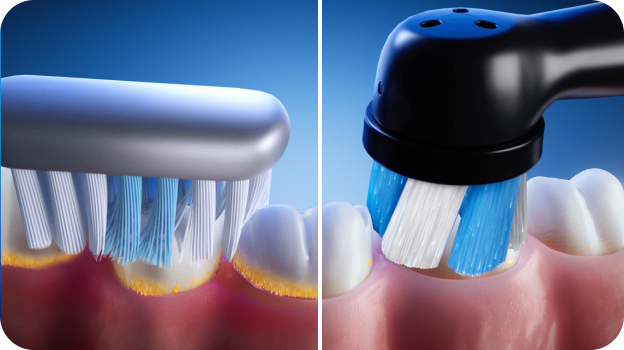
- RECOMMENDED FOR A GUIDED CLEAN FOR PLAQUE REMOVAL & GUM CARE — removes 100% more plaque along the gumline vs. a regular manual toothbrush
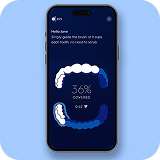
- INTERACTIVE DISPLAY WITH REAL‑TIME BRUSHING COACHING to help improve coverage, timing, and technique
- VISIBLE PRESSURE SENSOR PROTECTS YOUR GUMS by signaling optimal pressure and warning when brushing too hard or too soft
- 5 SMART CLEANING MODES FOR A PERSONALIZED CLEAN — Daily Clean, Whitening, Gum Care, Sensitive, and Intense
- CONNECTS TO THE ORAL‑B APP VIA BLUETOOTH to help track brushing habits and build better routines over time
- BRUSH FOR THE DENTIST‑RECOMMENDED TIME with a 2‑minute timer that alerts every 30 seconds to change zones
- COMPATIBLE WITH ALL ORAL‑B iO REPLACEMENT BRUSH HEADS — Ultimate Clean, Gum & Sensitive, Ultimate White, and Targeted Clean
- We offer a 30-day money-back guarantee so you can switch to Oral-B electric toothbrushes carefree.
- (1) Oral‑B iO Series 6 Electric Toothbrush
- (1) Brush Head
- (1) Travel Case
• Ebony 2026 Beauty + Grooming Awards: Ebony Beauty and Grooming Awards Best Tools
• HuffPost Shopping Awards 2026: Every Winning Product Featured In HuffPost's Shopping Awards | HuffPost Life
What is covered in my Oral-B warranty?
Your Oral-B warranty starts on the day of purchase and runs for 2 years. If your Oral-B product is defective during the warranty period, we will replace it free of charge*.
The warranty does not cover cosmetic damage such as scratches, or damage caused by:
- Normal wear and tear
- Accident, misuse, dirt or water
- The product being tampered with
- Improper use
- Repairs carried out by agents not authorized by Oral-B/Braun
- Failure to take proper care of the product, including recharging
- The product being altered or used for commercial purposes
How can I get my Oral-B electric toothbrush serviced?
If you’re experiencing a problem with your Oral-B toothbrush, check out our Online Repair Service! There you’ll find troubleshooting tips which may help resolve the issue. Simply go to www.service.oralb.com, select your Region, Country and Language and then click on the "Online Check" button.
If you’re unable to fix the problem and need to send your toothbrush for service, you can use the online service to print off a pre-paid mailing label and get a tracking number. The tracking number will enable you to track the progress of your request. Please note you must have a receipt that includes date of purchase to get a pre-paid mailing label and your brush must be within its warranty period.
If you’re unable to use the Online Repair Service, please see the instructions below.
For In Warranty service, follow these simple steps:
- Visit www.service.oralb.com to find details of your closest Oral-B Authorized Service Center.
- Send the product directly to the Service Center, including:
- All system components (e.g., toothbrush handle, charger, power cord, SmartGuide). You do not need to include accessories like the brush heads or refill stand.
- A copy of your dated proof of purchase (always keep a copy for yourself).
- A letter including the following information: your name, return mailing address, contact phone number, e-mail address and a brief explanation of the problem you're experiencing with the product.
If you include your e-mail address, the Oral-B Service center will send you updates when the product is received and when product is shipped back, along with a tracking number.
All products sent in for service must be well packaged and sent in a box suitable to withstand normal freight handling. It is recommended that your package is appropriately insured and shipped using a carrier who can provide tracking. We will cover all repair costs and return shipping to you.
For Out of Warranty service: You can still send your device to an Oral-B Authorized Service Center for service at your own cost. If the product warranty has expired, a quote will be sent to you for approval and payment, prior to any service. Before shipping your device, we recommend you call the authorized Service Center to discuss your service needs.
-
What's in the box
- RECOMMENDED FOR A GUIDED CLEAN FOR PLAQUE REMOVAL & GUM CARE — removes 100% more plaque along the gumline vs. a regular manual toothbrush
- INTERACTIVE DISPLAY WITH REAL‑TIME BRUSHING COACHING to help improve coverage, timing, and technique
- VISIBLE PRESSURE SENSOR PROTECTS YOUR GUMS by signaling optimal pressure and warning when brushing too hard or too soft
- 5 SMART CLEANING MODES FOR A PERSONALIZED CLEAN — Daily Clean, Whitening, Gum Care, Sensitive, and Intense
- CONNECTS TO THE ORAL‑B APP VIA BLUETOOTH to help track brushing habits and build better routines over time
- BRUSH FOR THE DENTIST‑RECOMMENDED TIME with a 2‑minute timer that alerts every 30 seconds to change zones
- COMPATIBLE WITH ALL ORAL‑B iO REPLACEMENT BRUSH HEADS — Ultimate Clean, Gum & Sensitive, Ultimate White, and Targeted Clean
- We offer a 30-day money-back guarantee so you can switch to Oral-B electric toothbrushes carefree.
- (1) Oral‑B iO Series 6 Electric Toothbrush
- (1) Brush Head
- (1) Travel Case
• Ebony 2026 Beauty + Grooming Awards: Ebony Beauty and Grooming Awards Best Tools
• HuffPost Shopping Awards 2026: Every Winning Product Featured In HuffPost's Shopping Awards | HuffPost Life
What is covered in my Oral-B warranty?
Your Oral-B warranty starts on the day of purchase and runs for 2 years. If your Oral-B product is defective during the warranty period, we will replace it free of charge*.
The warranty does not cover cosmetic damage such as scratches, or damage caused by:
- Normal wear and tear
- Accident, misuse, dirt or water
- The product being tampered with
- Improper use
- Repairs carried out by agents not authorized by Oral-B/Braun
- Failure to take proper care of the product, including recharging
- The product being altered or used for commercial purposes
How can I get my Oral-B electric toothbrush serviced?
If you’re experiencing a problem with your Oral-B toothbrush, check out our Online Repair Service! There you’ll find troubleshooting tips which may help resolve the issue. Simply go to www.service.oralb.com, select your Region, Country and Language and then click on the "Online Check" button.
If you’re unable to fix the problem and need to send your toothbrush for service, you can use the online service to print off a pre-paid mailing label and get a tracking number. The tracking number will enable you to track the progress of your request. Please note you must have a receipt that includes date of purchase to get a pre-paid mailing label and your brush must be within its warranty period.
If you’re unable to use the Online Repair Service, please see the instructions below.
For In Warranty service, follow these simple steps:
- Visit www.service.oralb.com to find details of your closest Oral-B Authorized Service Center.
- Send the product directly to the Service Center, including:
- All system components (e.g., toothbrush handle, charger, power cord, SmartGuide). You do not need to include accessories like the brush heads or refill stand.
- A copy of your dated proof of purchase (always keep a copy for yourself).
- A letter including the following information: your name, return mailing address, contact phone number, e-mail address and a brief explanation of the problem you're experiencing with the product.
If you include your e-mail address, the Oral-B Service center will send you updates when the product is received and when product is shipped back, along with a tracking number.
All products sent in for service must be well packaged and sent in a box suitable to withstand normal freight handling. It is recommended that your package is appropriately insured and shipped using a carrier who can provide tracking. We will cover all repair costs and return shipping to you.
For Out of Warranty service: You can still send your device to an Oral-B Authorized Service Center for service at your own cost. If the product warranty has expired, a quote will be sent to you for approval and payment, prior to any service. Before shipping your device, we recommend you call the authorized Service Center to discuss your service needs.
-
Make the most of every session
- RECOMMENDED FOR A GUIDED CLEAN FOR PLAQUE REMOVAL & GUM CARE — removes 100% more plaque along the gumline vs. a regular manual toothbrush
- INTERACTIVE DISPLAY WITH REAL‑TIME BRUSHING COACHING to help improve coverage, timing, and technique
- VISIBLE PRESSURE SENSOR PROTECTS YOUR GUMS by signaling optimal pressure and warning when brushing too hard or too soft
- 5 SMART CLEANING MODES FOR A PERSONALIZED CLEAN — Daily Clean, Whitening, Gum Care, Sensitive, and Intense
- CONNECTS TO THE ORAL‑B APP VIA BLUETOOTH to help track brushing habits and build better routines over time
- BRUSH FOR THE DENTIST‑RECOMMENDED TIME with a 2‑minute timer that alerts every 30 seconds to change zones
- COMPATIBLE WITH ALL ORAL‑B iO REPLACEMENT BRUSH HEADS — Ultimate Clean, Gum & Sensitive, Ultimate White, and Targeted Clean
- We offer a 30-day money-back guarantee so you can switch to Oral-B electric toothbrushes carefree.
- (1) Oral‑B iO Series 6 Electric Toothbrush
- (1) Brush Head
- (1) Travel Case
• Ebony 2026 Beauty + Grooming Awards: Ebony Beauty and Grooming Awards Best Tools
• HuffPost Shopping Awards 2026: Every Winning Product Featured In HuffPost's Shopping Awards | HuffPost Life
What is covered in my Oral-B warranty?
Your Oral-B warranty starts on the day of purchase and runs for 2 years. If your Oral-B product is defective during the warranty period, we will replace it free of charge*.
The warranty does not cover cosmetic damage such as scratches, or damage caused by:
- Normal wear and tear
- Accident, misuse, dirt or water
- The product being tampered with
- Improper use
- Repairs carried out by agents not authorized by Oral-B/Braun
- Failure to take proper care of the product, including recharging
- The product being altered or used for commercial purposes
How can I get my Oral-B electric toothbrush serviced?
If you’re experiencing a problem with your Oral-B toothbrush, check out our Online Repair Service! There you’ll find troubleshooting tips which may help resolve the issue. Simply go to www.service.oralb.com, select your Region, Country and Language and then click on the "Online Check" button.
If you’re unable to fix the problem and need to send your toothbrush for service, you can use the online service to print off a pre-paid mailing label and get a tracking number. The tracking number will enable you to track the progress of your request. Please note you must have a receipt that includes date of purchase to get a pre-paid mailing label and your brush must be within its warranty period.
If you’re unable to use the Online Repair Service, please see the instructions below.
For In Warranty service, follow these simple steps:
- Visit www.service.oralb.com to find details of your closest Oral-B Authorized Service Center.
- Send the product directly to the Service Center, including:
- All system components (e.g., toothbrush handle, charger, power cord, SmartGuide). You do not need to include accessories like the brush heads or refill stand.
- A copy of your dated proof of purchase (always keep a copy for yourself).
- A letter including the following information: your name, return mailing address, contact phone number, e-mail address and a brief explanation of the problem you're experiencing with the product.
If you include your e-mail address, the Oral-B Service center will send you updates when the product is received and when product is shipped back, along with a tracking number.
All products sent in for service must be well packaged and sent in a box suitable to withstand normal freight handling. It is recommended that your package is appropriately insured and shipped using a carrier who can provide tracking. We will cover all repair costs and return shipping to you.
For Out of Warranty service: You can still send your device to an Oral-B Authorized Service Center for service at your own cost. If the product warranty has expired, a quote will be sent to you for approval and payment, prior to any service. Before shipping your device, we recommend you call the authorized Service Center to discuss your service needs.
-
Featured in
- RECOMMENDED FOR A GUIDED CLEAN FOR PLAQUE REMOVAL & GUM CARE — removes 100% more plaque along the gumline vs. a regular manual toothbrush
- INTERACTIVE DISPLAY WITH REAL‑TIME BRUSHING COACHING to help improve coverage, timing, and technique
- VISIBLE PRESSURE SENSOR PROTECTS YOUR GUMS by signaling optimal pressure and warning when brushing too hard or too soft
- 5 SMART CLEANING MODES FOR A PERSONALIZED CLEAN — Daily Clean, Whitening, Gum Care, Sensitive, and Intense
- CONNECTS TO THE ORAL‑B APP VIA BLUETOOTH to help track brushing habits and build better routines over time
- BRUSH FOR THE DENTIST‑RECOMMENDED TIME with a 2‑minute timer that alerts every 30 seconds to change zones
- COMPATIBLE WITH ALL ORAL‑B iO REPLACEMENT BRUSH HEADS — Ultimate Clean, Gum & Sensitive, Ultimate White, and Targeted Clean
- We offer a 30-day money-back guarantee so you can switch to Oral-B electric toothbrushes carefree.
- (1) Oral‑B iO Series 6 Electric Toothbrush
- (1) Brush Head
- (1) Travel Case
• Ebony 2026 Beauty + Grooming Awards: Ebony Beauty and Grooming Awards Best Tools
• HuffPost Shopping Awards 2026: Every Winning Product Featured In HuffPost's Shopping Awards | HuffPost Life
What is covered in my Oral-B warranty?
Your Oral-B warranty starts on the day of purchase and runs for 2 years. If your Oral-B product is defective during the warranty period, we will replace it free of charge*.
The warranty does not cover cosmetic damage such as scratches, or damage caused by:
- Normal wear and tear
- Accident, misuse, dirt or water
- The product being tampered with
- Improper use
- Repairs carried out by agents not authorized by Oral-B/Braun
- Failure to take proper care of the product, including recharging
- The product being altered or used for commercial purposes
How can I get my Oral-B electric toothbrush serviced?
If you’re experiencing a problem with your Oral-B toothbrush, check out our Online Repair Service! There you’ll find troubleshooting tips which may help resolve the issue. Simply go to www.service.oralb.com, select your Region, Country and Language and then click on the "Online Check" button.
If you’re unable to fix the problem and need to send your toothbrush for service, you can use the online service to print off a pre-paid mailing label and get a tracking number. The tracking number will enable you to track the progress of your request. Please note you must have a receipt that includes date of purchase to get a pre-paid mailing label and your brush must be within its warranty period.
If you’re unable to use the Online Repair Service, please see the instructions below.
For In Warranty service, follow these simple steps:
- Visit www.service.oralb.com to find details of your closest Oral-B Authorized Service Center.
- Send the product directly to the Service Center, including:
- All system components (e.g., toothbrush handle, charger, power cord, SmartGuide). You do not need to include accessories like the brush heads or refill stand.
- A copy of your dated proof of purchase (always keep a copy for yourself).
- A letter including the following information: your name, return mailing address, contact phone number, e-mail address and a brief explanation of the problem you're experiencing with the product.
If you include your e-mail address, the Oral-B Service center will send you updates when the product is received and when product is shipped back, along with a tracking number.
All products sent in for service must be well packaged and sent in a box suitable to withstand normal freight handling. It is recommended that your package is appropriately insured and shipped using a carrier who can provide tracking. We will cover all repair costs and return shipping to you.
For Out of Warranty service: You can still send your device to an Oral-B Authorized Service Center for service at your own cost. If the product warranty has expired, a quote will be sent to you for approval and payment, prior to any service. Before shipping your device, we recommend you call the authorized Service Center to discuss your service needs.
-
Warranty Information
- RECOMMENDED FOR A GUIDED CLEAN FOR PLAQUE REMOVAL & GUM CARE — removes 100% more plaque along the gumline vs. a regular manual toothbrush
- INTERACTIVE DISPLAY WITH REAL‑TIME BRUSHING COACHING to help improve coverage, timing, and technique
- VISIBLE PRESSURE SENSOR PROTECTS YOUR GUMS by signaling optimal pressure and warning when brushing too hard or too soft
- 5 SMART CLEANING MODES FOR A PERSONALIZED CLEAN — Daily Clean, Whitening, Gum Care, Sensitive, and Intense
- CONNECTS TO THE ORAL‑B APP VIA BLUETOOTH to help track brushing habits and build better routines over time
- BRUSH FOR THE DENTIST‑RECOMMENDED TIME with a 2‑minute timer that alerts every 30 seconds to change zones
- COMPATIBLE WITH ALL ORAL‑B iO REPLACEMENT BRUSH HEADS — Ultimate Clean, Gum & Sensitive, Ultimate White, and Targeted Clean
- We offer a 30-day money-back guarantee so you can switch to Oral-B electric toothbrushes carefree.
- (1) Oral‑B iO Series 6 Electric Toothbrush
- (1) Brush Head
- (1) Travel Case
• Ebony 2026 Beauty + Grooming Awards: Ebony Beauty and Grooming Awards Best Tools
• HuffPost Shopping Awards 2026: Every Winning Product Featured In HuffPost's Shopping Awards | HuffPost Life
What is covered in my Oral-B warranty?
Your Oral-B warranty starts on the day of purchase and runs for 2 years. If your Oral-B product is defective during the warranty period, we will replace it free of charge*.
The warranty does not cover cosmetic damage such as scratches, or damage caused by:
- Normal wear and tear
- Accident, misuse, dirt or water
- The product being tampered with
- Improper use
- Repairs carried out by agents not authorized by Oral-B/Braun
- Failure to take proper care of the product, including recharging
- The product being altered or used for commercial purposes
How can I get my Oral-B electric toothbrush serviced?
If you’re experiencing a problem with your Oral-B toothbrush, check out our Online Repair Service! There you’ll find troubleshooting tips which may help resolve the issue. Simply go to www.service.oralb.com, select your Region, Country and Language and then click on the "Online Check" button.
If you’re unable to fix the problem and need to send your toothbrush for service, you can use the online service to print off a pre-paid mailing label and get a tracking number. The tracking number will enable you to track the progress of your request. Please note you must have a receipt that includes date of purchase to get a pre-paid mailing label and your brush must be within its warranty period.
If you’re unable to use the Online Repair Service, please see the instructions below.
For In Warranty service, follow these simple steps:
- Visit www.service.oralb.com to find details of your closest Oral-B Authorized Service Center.
- Send the product directly to the Service Center, including:
- All system components (e.g., toothbrush handle, charger, power cord, SmartGuide). You do not need to include accessories like the brush heads or refill stand.
- A copy of your dated proof of purchase (always keep a copy for yourself).
- A letter including the following information: your name, return mailing address, contact phone number, e-mail address and a brief explanation of the problem you're experiencing with the product.
If you include your e-mail address, the Oral-B Service center will send you updates when the product is received and when product is shipped back, along with a tracking number.
All products sent in for service must be well packaged and sent in a box suitable to withstand normal freight handling. It is recommended that your package is appropriately insured and shipped using a carrier who can provide tracking. We will cover all repair costs and return shipping to you.
For Out of Warranty service: You can still send your device to an Oral-B Authorized Service Center for service at your own cost. If the product warranty has expired, a quote will be sent to you for approval and payment, prior to any service. Before shipping your device, we recommend you call the authorized Service Center to discuss your service needs.


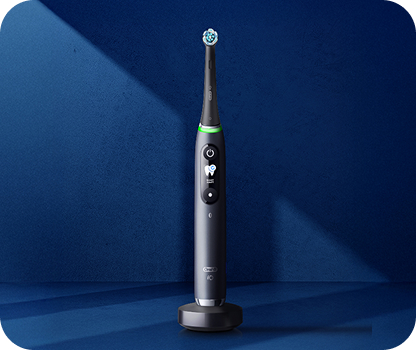
iO Series 6 Rechargeable Electric Toothbrush (Connected Coach), Grey Opal
The Oral-B iO Series 6 rechargeable electric toothbrush delivers a more guided clean for plaque removal and gum care. Its interactive display coaches you in real time to a deeper clean, removing 100% more plaque along the gumline versus a regular manual toothbrush while helping care for your gums.
A visible pressure sensor protects your gums and enamel, and a built-in 2-minute timer paces a complete clean. Choose from 5 cleaning modes — Daily Clean, Whitening, Gum Care, Sensitive, and Intense. Best of all, it's brought to you by Oral-B — the #1 brand used by dentists worldwide.*
*Based on surveys of a representative worldwide sample of dentists carried out for P&G regularly.
Do not use on children under age 3.
Replace brush head every 3 months or sooner if brush head becomes worn.
- Minimum Purchase:
- 1 unit
- Maximum Purchase:
- 5 units
- colorSwatches:
- iO6DD-Gray Opal
- notify-text-button:
- yes
- retailer-button-enablement:
- yes
- Shop By Feature:
- 5 SMART Brushing Modes
- Shop By Feature:
- Interactive Display
- Shop By Feature:
- Artificial Intelligence
- Shop By Feature:
- 1 Brush
- Shop By Feature:
- 1 refill head
- Shop By Feature:
- 1 Magnetic Travel Pouch
- Shop By Feature:
- 1-Magnetic Charger
- couponCardSort:
- 2
- color-picker:
- gray-opal
- sort-color:
- 2
- et-sort:
- 9
- Refill-Product-Id:
- 1520
- frequently-bought-together:
- enable
- bvProductId:
- OralB_iO6_Handle
- algolia-hierarchy:
- category_electric-toothbrushes_io
- algolia-hierarchy:
- gifts_for-him
- algolia-sortorder:
- 1 E-SingleProduct
- algolia-deal:
- yes
- restrict-coupon:
- no
- algolia-hierarchy:
- color_grey;#E1EAE9
- freeShippingText:
- Free Shipping
You May Also Like


 $40 off
Oral-B iO Series 6 Rechargeable Electric Toothbrush (Connected Coach), Grey Opal
$119.99
$159.99
Save $40.00
Free Shipping
Add to cart

 $20 off
iO Series 3 Rechargeable Electric Toothbrush, Icy Blue
$69.99
$89.99
Save $20.00
Free Shipping
Add to cart
Oral-B iO Series 6 Electric Toothbrush FAQs
How do I change the language on Oral-B iO Series 6?
- Turn on your toothbrush and let the display “wake up”.
- Access the Settings menu.
- Find the Language option.
- In the Settings menu, scroll through the options until you see “Language”.
- Select “Language” and you will be presented with a list of available languages.
- Choose your preferred language.
- Scroll to the language you want, then select it.
- Confirm your selection if prompted. The display should update to show all menus and instructions in your chosen language.
- Exit the menu.
How do I turn off the Oral-B iO Series 6 toothbrush?
The Oral-B iO Series 6 is designed with energy efficiency in mind, and it typically turns off automatically after a period of inactivity (usually around 3 minutes) once you finish brushing. However, if you’d like to turn it off manually or be sure it’s powered down right away, here are a few tips:
- Manual power off: Press and hold the main power button briefly until the display turns off.
- Charging station: If your device is placed on its charging station after use, it will typically enter standby mode and shut off the display, conserving battery life until you are ready to brush again.
What is the difference between the Oral-B iO Series 5 and 6?
While both the Oral-B iO Series 5 and Series 6 deliver a high-quality brushing experience with Oral-B’s signature oscillating-rotating and micro-vibration technology, there are several differences that set the two models apart.
Display and User Interface
- Series 6 has a more refined, interactive display that can provide additional real time feedback and coaching tips.
- The Series 5 has a simpler display setup. The extra interface features on the Series 6 are designed to help you track your brushing performance a bit more seamlessly.
Brushing Modes and Features
- Although both models offer multiple cleaning modes, the Series 6 provides more guidance through its display, which can help in achieving optimal brushing habits.
Connectivity and App Integration
- Both models connect with the Oral-B app via Bluetooth, but enhanced app interactions on the Series 6 can result in a more detailed brushing analysis, personalized tips, and sometimes improved firmware updates or feature releases.
Is the Oral-B iO Series 6 compatible with the Oral-B magnetic fast charger?
No, The Oral-B iO Series 6 is designed with a specific charging system. Oral-B recommends using only the charger that comes with your iO Series 6 or an official replacement from Oral-B. This ensures optimal performance and proper operation of your toothbrush.
Does the Oral-B iO Series 6 come with a premium travel case?
Yes. The Oral-B iO Series 6 comes with a hard travel case.
Does the Oral-B iO Series 6 screen greet me and show a timer while I brush?
Yes, the Oral-B iO Series 6 is designed to enhance your brushing experience with an interactive display. When you begin brushing, the screen “greets” you and provides useful information such as the selected brushing mode and a built-in timer to help you keep track of your brushing duration.

Reviews powered by Bazaarvoice
iO Series 6 Rechargeable Electric Toothbrush (Connected Coach), Grey Opal
Overall rating
4.0/5
the perfect brush for my teeth
14/06/2024 by Elena Sucila
I have used many toothbrushes and none of them satisfied me. I thought it was from the toothpaste. But since I discovered this brush, I realize that everything I used was wrong. It is perfect. Teeth mine are clean, I know 100% that they are brushed without destroying them and above all the brush has a fabulous design. I recommend it with love